Time Series Track · Part 2 of 3

Stationarity in Time Series Analysis

Time Series
Stationarity
Python
Learn how to detect non-stationarity in time series using statistical tests and apply techniques like differencing, transformations, and detrending to achieve stationarity.
Author

Gujuri Alekha

Published

Oct 11, 2026

2.1 Types of Stationarity

  • Weak Stationarity: Requires only that the mean, variance, and auto-correlation remain constant over time. and the joint probability distribution may change over time.

  • Strict Stationarity: A time series is strictly stationary when its entire joint probability distribution remains unchanged regardless of the time period, encompassing all properties of weak stationarity.

  • Non-Stationary: A non-stationary series shows changing patterns like trends or seasonality and often needs transformation before modeling

Show code
# load indian stocks nifty50 data

import yfinance as yf
import pandas as pd
import matplotlib.pyplot as plt

import warnings
warnings.filterwarnings('ignore')

# Download NIFTY 50 data
nifty_50 = yf.download(
    "^NSEI",
    start="2025-01-01",
    end="2026-01-01",
    auto_adjust=False
)

nifty_50.head()
Price Adj Close Close High Low Open Volume
Ticker ^NSEI ^NSEI ^NSEI ^NSEI ^NSEI ^NSEI
Date
2025-01-01 23742.900391 23742.900391 23822.800781 23562.800781 23637.650391 154900
2025-01-02 24188.650391 24188.650391 24226.699219 23751.550781 23783.000000 283200
2025-01-03 24004.750000 24004.750000 24196.449219 23976.000000 24196.400391 312300
2025-01-06 23616.050781 23616.050781 24089.949219 23551.900391 24045.800781 278100
2025-01-07 23707.900391 23707.900391 23795.199219 23637.800781 23679.900391 262300
Show code
import numpy as np
import matplotlib.pyplot as plt

# Set seed for reproducibility
np.random.seed(42)
time = np.arange(1, 201)

# --- 1. Stationary Series (Constant Mean, Variance, and Autocovariance) ---
noise_stationary = np.random.normal(0, 1, len(time))
series_stationary = np.zeros(len(time))
# Create a stationary AR(1) process: y_t = 0.5 * y_{t-1} + e_t
for t in range(1, len(time)):
    series_stationary[t] = 0.5 * series_stationary[t-1] + noise_stationary[t]

# --- 2. Non-Stationary: Changing Mean (Trend exists) ---
series_trend = 0.1 * time + np.random.normal(0, 1, len(time))

# --- 3. Non-Stationary: Changing Variance (Heteroscedasticity) ---
# Spread increases exponentially or linearly over time
variance_scale = 0.03 * time
series_variance = np.random.normal(0, 1, len(time)) * variance_scale

# --- 4. Non-Stationary: Changing Covariance (Structural Change) ---
# Low frequency dependency in first half, high frequency in second half
series_covariance = np.zeros(len(time))
for t in range(1, len(time)):
    if t < 100:
        series_covariance[t] = 0.9 * series_covariance[t-1] + np.random.normal(0, 0.5)
    else:
        series_covariance[t] = -0.8 * series_covariance[t-1] + np.random.normal(0, 0.5)

# --- Plotting the grid comparing Stationary vs. Non-Stationary ---
fig, axes = plt.subplots(2, 2, figsize=(16, 10))

# Subplot 1: Stationary
axes[0, 0].plot(time, series_stationary, color='forestgreen', alpha=0.85)
axes[0, 0].axhline(y=0, color='black', linestyle='--', alpha=0.7, label='Constant Mean (0)')
axes[0, 0].set_title('Stationary: Constant Mean & Constant Spread', fontsize=12, fontweight='bold')
axes[0, 0].set_ylabel('Value')
axes[0, 0].legend(loc='upper left')
axes[0, 0].grid(True, linestyle=':', alpha=0.6)

# Subplot 2: Non-Stationary - Changing Mean
axes[0, 1].plot(time, series_trend, color='darkorange', alpha=0.85)
axes[0, 1].plot(time, 0.1 * time, color='black', linestyle='--', label='Changing Mean (Trend)')
axes[0, 1].set_title('Non-Stationary: Changing Mean (Trend)', fontsize=12, fontweight='bold')
axes[0, 1].legend(loc='upper left')
axes[0, 1].grid(True, linestyle=':', alpha=0.6)

# Subplot 3: Non-Stationary - Changing Variance
axes[1, 0].plot(time, series_variance, color='crimson', alpha=0.85)
axes[1, 0].plot(time, 2 * variance_scale, color='black', linestyle=':', label='+2 Std Dev')
axes[1, 0].plot(time, -2 * variance_scale, color='black', linestyle=':', label='-2 Std Dev')
axes[1, 0].set_title('Non-Stationary: Changing Variance (Unstable Spread)', fontsize=12, fontweight='bold')
axes[1, 0].set_xlabel('Time')
axes[1, 0].set_ylabel('Value')
axes[1, 0].legend(loc='upper left')
axes[1, 0].grid(True, linestyle=':', alpha=0.6)

# Subplot 4: Non-Stationary - Changing Covariance
axes[1, 1].plot(time, series_covariance, color='purple', alpha=0.85)
axes[1, 1].axvline(x=100, color='red', linestyle='--', label='Structural Change Point')
axes[1, 1].set_title('Non-Stationary: Changing Autocovariance', fontsize=12, fontweight='bold')
axes[1, 1].set_xlabel('Time')
axes[1, 1].legend(loc='upper left')
axes[1, 1].grid(True, linestyle=':', alpha=0.6)

plt.suptitle('Stationary vs. Non-Stationary Behaviors', fontsize=16, fontweight='bold', y=0.98)
plt.tight_layout()
plt.show()
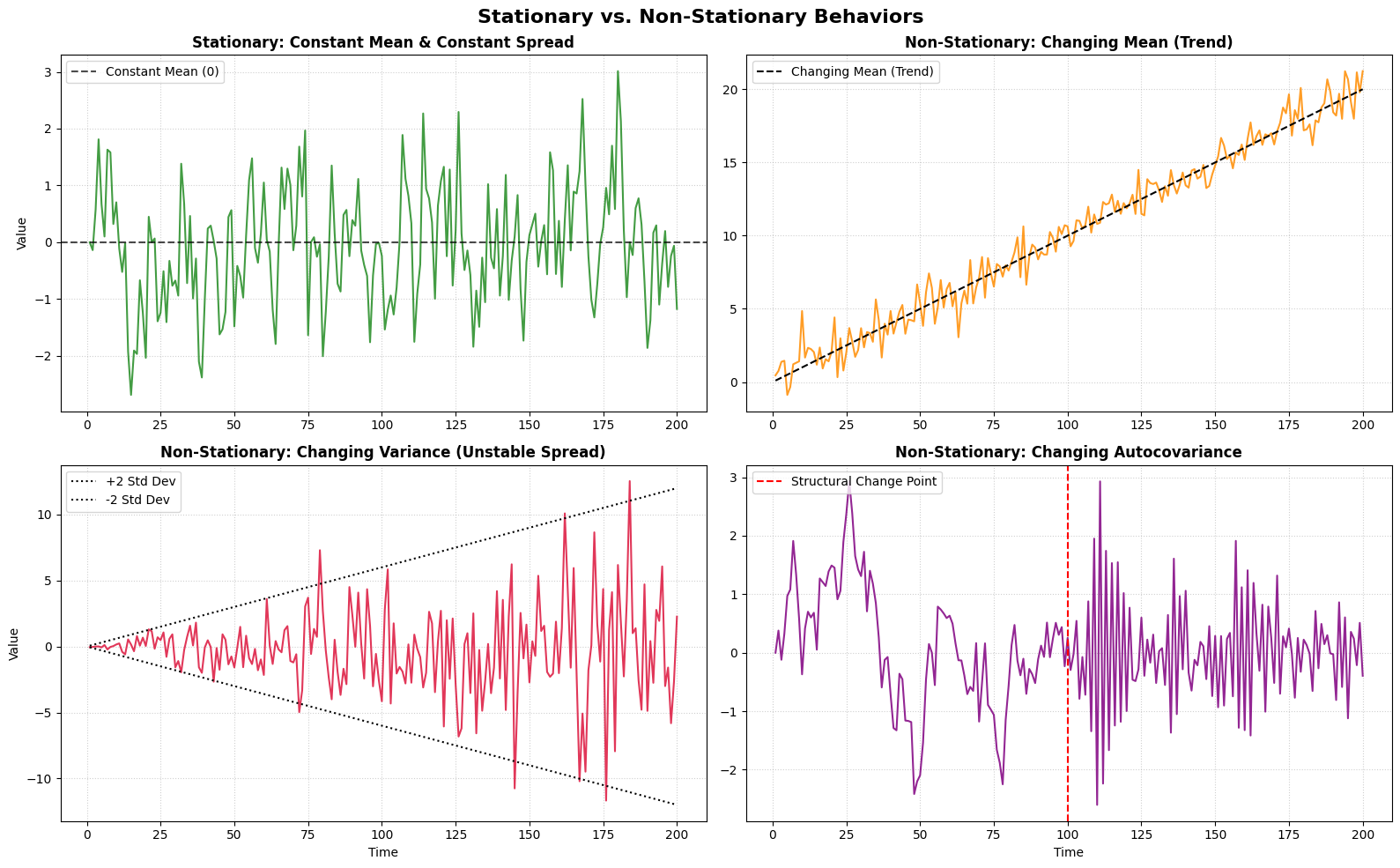
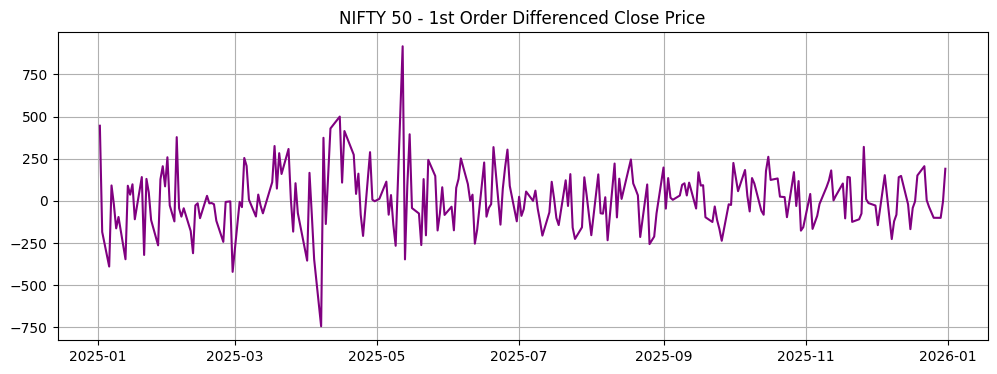
Chart: 2.1 Types of Stationarity

2.2 Stationarity Tests in Time Series Analysis

2.2.1 Weak Stationarity Tests

The two most common statistical tests for verifying weak stationarity are:

ADF (Augmented Dickey-Fuller) Test

ADF is a statistical test used to check whether a time series has a unit root (a non-stationary trend), which indicates that the series is non-stationary. * H_0 (Null Hypothesis): The series is non-stationary (contains a unit root). * H_1 (Alternative Hypothesis): The series is stationary. * Decision Rule: p\text{-value} < 0.05 \rightarrow Reject H_0 \rightarrow The series is likely stationary.

KPSS (Kwiatkowski–Phillips–Schmidt–Shin) Test

KPSS is a statistical test used to check whether a time series is stationary around a constant mean or a deterministic trend. * H_0 (Null Hypothesis): The series is stationary. * H_1 (Alternative Hypothesis): The series is non-stationary. * Decision Rule: p\text{-value} < 0.05 \rightarrow Reject H_0 \rightarrow The series is likely non-stationary.

2.2.2 Strict Stationarity Tests

Kolmogorov-Smirnov (K-S) Test

The Kolmogorov-Smirnov test is specifically used to check for strict stationarity by comparing the cumulative distribution functions (CDFs) of two different samples within the time series. * Methodology: It splits the time series into separate sub-samples and compares their distributions. * Decision Rule: A high p\text{-value} (> 0.05) suggests there is no statistically significant difference in distribution between the samples, implying strict stationarity.

Show code
import pandas as pd
import numpy as np
from statsmodels.tsa.stattools import adfuller

close_prices = nifty_50['Close'].dropna()


# 1. Augmented Dickey-Fuller (ADF) Test (Weak Stationarity)
print("\n--- [1] Augmented Dickey-Fuller (ADF) Test ---")
adf_result = adfuller(close_prices)
print(f"ADF Statistic: {adf_result[0]:.4f}")
print(f"p-value: {adf_result[1]:.4f}")
print("Critical Values:")
for key, value in adf_result[4].items():
    print(f"   {key}: {value:.4f}")

if adf_result[1] < 0.05:
    print("Conclusion: Reject H₀. The series is likely STATIONARY.")
else:
    print("Conclusion: Fail to reject H₀. The series is likely NON-STATIONARY.")

--- [1] Augmented Dickey-Fuller (ADF) Test ---
ADF Statistic: -0.9981
p-value: 0.7539
Critical Values:
   1%: -3.4570
   5%: -2.8733
   10%: -2.5730
Conclusion: Fail to reject H₀. The series is likely NON-STATIONARY.
Show code
from statsmodels.tsa.stattools import kpss

# Drop any missing values and squeeze to ensure it is 1-dimensional
close_prices = nifty_50['Close'].dropna().squeeze()

# 2. KPSS Test (Weak Stationarity)
print("\n--- [2] KPSS Test ---")

# 'ct' specifies stationary around a trend, 'c' around a constant mean
kpss_result = kpss(close_prices, regression='c', nlags='auto')
print(f"KPSS Statistic: {kpss_result[0]:.4f}")
print(f"p-value: {kpss_result[1]:.4f}")
print("Critical Values:")
for key, value in kpss_result[3].items():
    print(f"   {key}: {value:.4f}")

if kpss_result[1] < 0.05:
    print("Conclusion: Reject H₀. The series is likely NON-STATIONARY.")
else:
    print("Conclusion: Fail to reject H₀. The series is likely STATIONARY.")

--- [2] KPSS Test ---
KPSS Statistic: 1.9127
p-value: 0.0100
Critical Values:
   10%: 0.3470
   5%: 0.4630
   2.5%: 0.5740
   1%: 0.7390
Conclusion: Reject H₀. The series is likely NON-STATIONARY.
Show code
from scipy.stats import ks_2samp

# Drop any missing values and squeeze to ensure it is 1-dimensional
close_prices = nifty_50['Close'].dropna().squeeze()

# 3. Kolmogorov-Smirnov (K-S) Test (Strict Stationarity)
print("\n--- [3] Kolmogorov-Smirnov (K-S) Test ---")

# Split the series into two halves to compare their probability distributions
midpoint = len(close_prices) // 2
sample_1 = close_prices.iloc[:midpoint]
sample_2 = close_prices.iloc[midpoint:]

ks_stat, ks_p_value = ks_2samp(sample_1, sample_2)
print(f"KS Statistic: {ks_stat:.4f}")
print(f"p-value: {ks_p_value:.4e}")

if ks_p_value > 0.05:
    print("Conclusion: High p-value. Cumulative distributions are similar (suggests STRICT STATIONARITY).")
else:
    print("Conclusion: Low p-value. Cumulative distributions are significantly different (NON-STATIONARY).")

--- [3] Kolmogorov-Smirnov (K-S) Test ---
KS Statistic: 0.6856
p-value: 2.6273e-28
Conclusion: Low p-value. Cumulative distributions are significantly different (NON-STATIONARY).

3. Techniques to Make Non-Stationary Time Series Stationary

A time series is stationary when its statistical properties—such as mean, variance, and autocovariance—are stable over time. A common workflow is to identify the source of non-stationarity, apply an appropriate transformation, and then verify stationarity using tests such as ADF and KPSS.

There are 4 main approaches to convert non-stationary data into stationary:

  1. Differencing
    • Subtracting past values from current observations to remove trends and seasonality. This includes first-order and second-order differencing.
  2. Transformation
    • Used to stabilize the variance of the data, covering logarithmic, power (like square root), and Box-Cox transformations.

    • Log transformation converts the original values to their logarithms and is commonly used when the variance increases with the level of the time series.

    • A square-root transformation reduces the effect of large values and can be used to stabilize variance, particularly for count-type data.

    • Box-Cox transformation: Instead of manually deciding whether to use a log or square-root transformation, Box-Cox provides a parameter lambda that determines the appropriate power transformation.

      • λ = 1: No transformation
      • λ = 0.5: Square root
      • λ = 0: Log
      • λ = -1: Reciprocal
  3. Detrending
    • Removing the trend component from data, typically using linear detrending (fitting a regression line) or moving average techniques.
  4. Seasonal Adjustment
    • Removing seasonal components from the data, often performed using techniques like STL decomposition or classical decomposition.

3.1 Helper Function for Stationarity Testing

We will define a helper function check_stationarity that performs both the Augmented Dickey-Fuller (ADF) and Kwiatkowski-Phillips-Schmidt-Shin (KPSS) tests to make verifying stationarity easy.

Show code
from statsmodels.tsa.stattools import adfuller, kpss
import pandas as pd
import numpy as np
import warnings
warnings.filterwarnings('ignore')

def check_stationarity(series, title="Time Series"):
    series = pd.Series(series).dropna()
    print(f"\n{'='*10} Stationarity Analysis: {title} {'='*10}")

    # 1. ADF Test
    adf_res = adfuller(series)
    adf_stat, adf_p = adf_res[0], adf_res[1]
    is_adf_stationary = adf_p < 0.05

    # 2. KPSS Test
    kpss_res = kpss(series, regression='c', nlags='auto')
    kpss_stat, kpss_p = kpss_res[0], kpss_res[1]
    is_kpss_stationary = kpss_p >= 0.05

    # Print Results
    print(f"[ADF Test]  Stat: {adf_stat:.4f}, p-value: {adf_p:.4f} -> Conclusion: {'STATIONARY' if is_adf_stationary else 'NON-STATIONARY'}")
    print(f"[KPSS Test] Stat: {kpss_stat:.4f}, p-value: {kpss_p:.4f} -> Conclusion: {'STATIONARY' if is_kpss_stationary else 'NON-STATIONARY'}")

    if is_adf_stationary and is_kpss_stationary:
        print("==> Overall Verdict: Strong evidence of STATIONARITY (Both tests agree).")
    elif not is_adf_stationary and not is_kpss_stationary:
        print("==> Overall Verdict: Strong evidence of NON-STATIONARITY (Both tests agree).")
    else:
        print("==> Overall Verdict: Mixed signals / Trend-stationarity suspected. Exercise caution.")

3.2 Technique 1: Differencing

Subtracting past values from current observations to remove trends and seasonality.

Show code
close_prices = nifty_50['Close'].dropna().squeeze()

# Before differencing
check_stationarity(close_prices, "Original Close Prices")

# Apply 1st order Differencing
diff_prices = close_prices.diff().dropna()

# After differencing
check_stationarity(diff_prices, "First-Order Differenced Prices")

# Plotting
import matplotlib.pyplot as plt
plt.figure(figsize=(12, 4))
plt.plot(diff_prices, color='purple')
plt.title("NIFTY 50 - 1st Order Differenced Close Price")
plt.grid(True)
plt.show()

========== Stationarity Analysis: Original Close Prices ==========
[ADF Test]  Stat: -0.9981, p-value: 0.7539 -> Conclusion: NON-STATIONARY
[KPSS Test] Stat: 1.9127, p-value: 0.0100 -> Conclusion: NON-STATIONARY
==> Overall Verdict: Strong evidence of NON-STATIONARITY (Both tests agree).

========== Stationarity Analysis: First-Order Differenced Prices ==========
[ADF Test]  Stat: -15.6484, p-value: 0.0000 -> Conclusion: STATIONARY
[KPSS Test] Stat: 0.0578, p-value: 0.1000 -> Conclusion: STATIONARY
==> Overall Verdict: Strong evidence of STATIONARITY (Both tests agree).

Chart: 3.2 Technique 1: Differencing

3.3 Technique 2: Transformations (Log, Square Root, and Box-Cox)

Let’s apply logarithmic, square root, and Box-Cox transformations and check their impact on stationarity.

Show code
from scipy.stats import boxcox

close_prices = nifty_50['Close'].dropna().squeeze()

# 1. Log Transformation
log_prices = np.log(close_prices)
check_stationarity(log_prices, "Log Transformed Prices")

# 2. Square Root Transformation
sqrt_prices = np.sqrt(close_prices)
check_stationarity(sqrt_prices, "Square Root Transformed Prices")

# 3. Box-Cox Transformation
boxcox_prices, fitted_lambda = boxcox(close_prices)
check_stationarity(boxcox_prices, f"Box-Cox Transformed Prices (λ = {fitted_lambda:.4f})")

========== Stationarity Analysis: Log Transformed Prices ==========
[ADF Test]  Stat: -1.0300, p-value: 0.7422 -> Conclusion: NON-STATIONARY
[KPSS Test] Stat: 1.8981, p-value: 0.0100 -> Conclusion: NON-STATIONARY
==> Overall Verdict: Strong evidence of NON-STATIONARITY (Both tests agree).

========== Stationarity Analysis: Square Root Transformed Prices ==========
[ADF Test]  Stat: -1.0138, p-value: 0.7482 -> Conclusion: NON-STATIONARY
[KPSS Test] Stat: 1.9056, p-value: 0.0100 -> Conclusion: NON-STATIONARY
==> Overall Verdict: Strong evidence of NON-STATIONARITY (Both tests agree).

========== Stationarity Analysis: Box-Cox Transformed Prices (λ = 6.8388) ==========
[ADF Test]  Stat: 0.7174, p-value: 0.9902 -> Conclusion: NON-STATIONARY
[KPSS Test] Stat: 1.9673, p-value: 0.0100 -> Conclusion: NON-STATIONARY
==> Overall Verdict: Strong evidence of NON-STATIONARITY (Both tests agree).

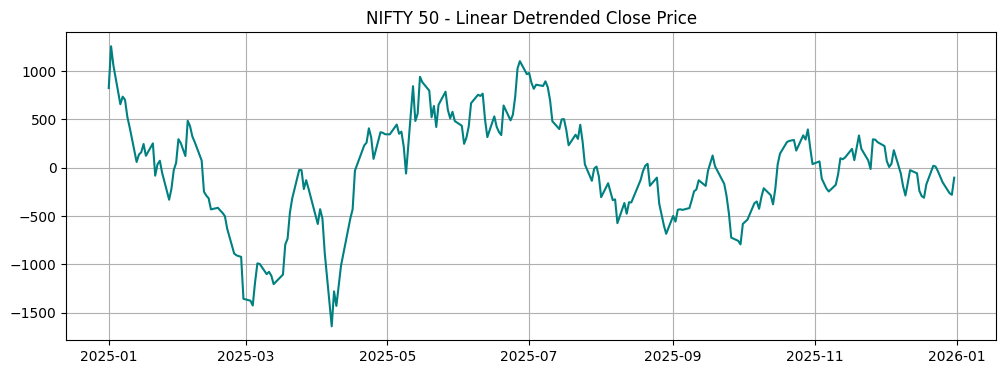
3.4 Technique 3: Detrending

Removing the long-term trend component using a linear regression model on the time index.

Show code
from sklearn.linear_model import LinearRegression

close_prices = nifty_50['Close'].dropna().squeeze()

# Before detrending
check_stationarity(close_prices, "Original Close Prices")

# Fit linear regression to model the trend
X = np.arange(len(close_prices)).reshape(-1, 1)
y = close_prices.values
model = LinearRegression().fit(X, y)
trend_pred = model.predict(X)

# Subtract predicted linear trend from original values
detrended_prices = close_prices - trend_pred

# After detrending
check_stationarity(detrended_prices, "Linear Detrended Prices")

# Plotting
plt.figure(figsize=(12, 4))
plt.plot(close_prices.index, detrended_prices, color='teal')
plt.title("NIFTY 50 - Linear Detrended Close Price")
plt.grid(True)
plt.show()

========== Stationarity Analysis: Original Close Prices ==========
[ADF Test]  Stat: -0.9981, p-value: 0.7539 -> Conclusion: NON-STATIONARY
[KPSS Test] Stat: 1.9127, p-value: 0.0100 -> Conclusion: NON-STATIONARY
==> Overall Verdict: Strong evidence of NON-STATIONARITY (Both tests agree).

========== Stationarity Analysis: Linear Detrended Prices ==========
[ADF Test]  Stat: -2.8938, p-value: 0.0461 -> Conclusion: STATIONARY
[KPSS Test] Stat: 0.1637, p-value: 0.1000 -> Conclusion: STATIONARY
==> Overall Verdict: Strong evidence of STATIONARITY (Both tests agree).

Chart: 3.4 Technique 3: Detrending

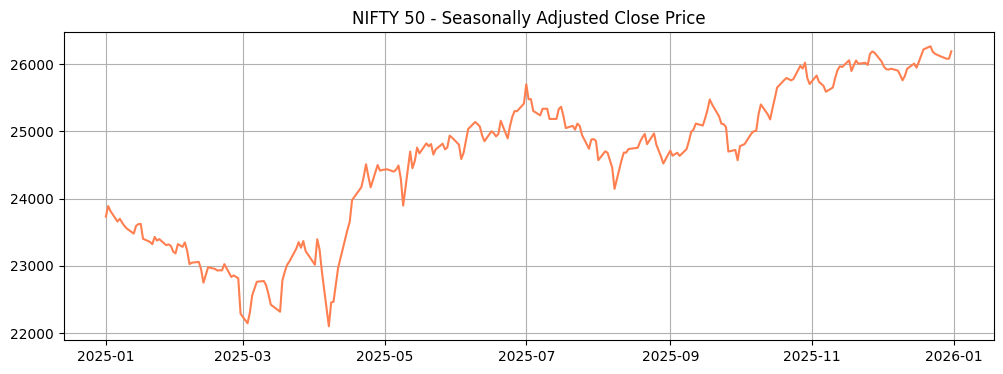
3.5 Technique 4: Seasonal Adjustment

Subtracting the seasonal component obtained via robust STL decomposition.

Show code
from statsmodels.tsa.seasonal import STL

close_prices = nifty_50['Close'].dropna().squeeze()

# Before seasonal adjustment
check_stationarity(close_prices, "Original Close Prices")

# Extract seasonality via STL
stl = STL(close_prices, period=30, robust=True)
result = stl.fit()

# Subtract the seasonal component
seasonally_adjusted = close_prices - result.seasonal

# After seasonal adjustment
check_stationarity(seasonally_adjusted, "Seasonally Adjusted Prices (STL)")

# Plotting
plt.figure(figsize=(12, 4))
plt.plot(close_prices.index, seasonally_adjusted, color='coral')
plt.title("NIFTY 50 - Seasonally Adjusted Close Price")
plt.grid(True)
plt.show()

========== Stationarity Analysis: Original Close Prices ==========
[ADF Test]  Stat: -0.9981, p-value: 0.7539 -> Conclusion: NON-STATIONARY
[KPSS Test] Stat: 1.9127, p-value: 0.0100 -> Conclusion: NON-STATIONARY
==> Overall Verdict: Strong evidence of NON-STATIONARITY (Both tests agree).

========== Stationarity Analysis: Seasonally Adjusted Prices (STL) ==========
[ADF Test]  Stat: -0.8476, p-value: 0.8047 -> Conclusion: NON-STATIONARY
[KPSS Test] Stat: 1.9290, p-value: 0.0100 -> Conclusion: NON-STATIONARY
==> Overall Verdict: Strong evidence of NON-STATIONARITY (Both tests agree).

Chart: 3.5 Technique 4: Seasonal Adjustment

3.6 Checking Stationarity Visually with a Trendline and Rolling Moving Average

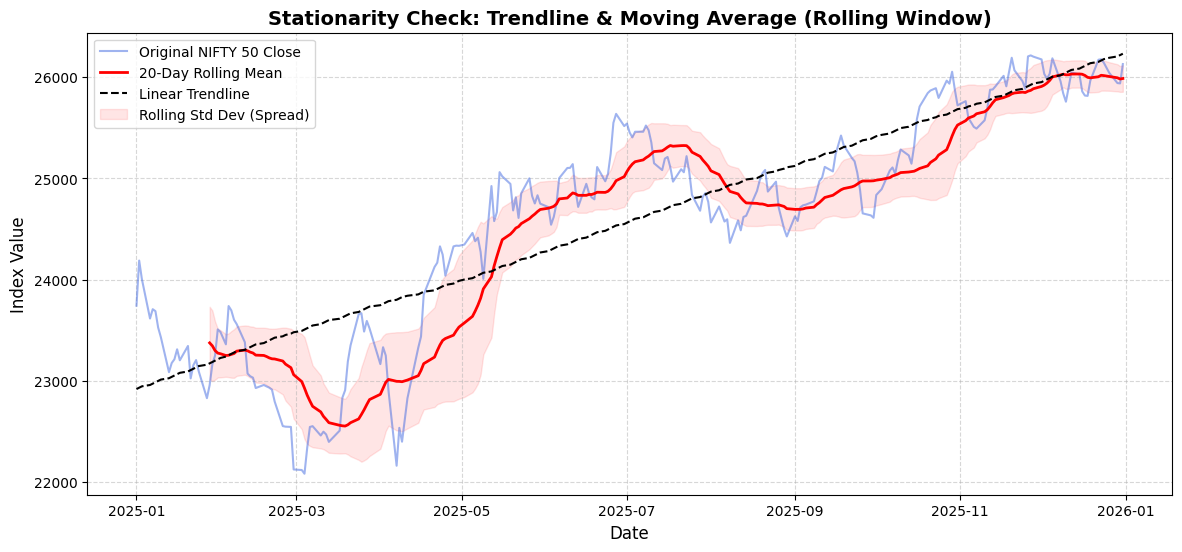
To visually inspect stationarity, we can plot the original time series alongside: 1. A fitted Linear Trendline to see if the overall mean changes continuously over the entire period. 2. A Rolling Moving Average (e.g., 20-day window) to see how the local mean behaves over time.

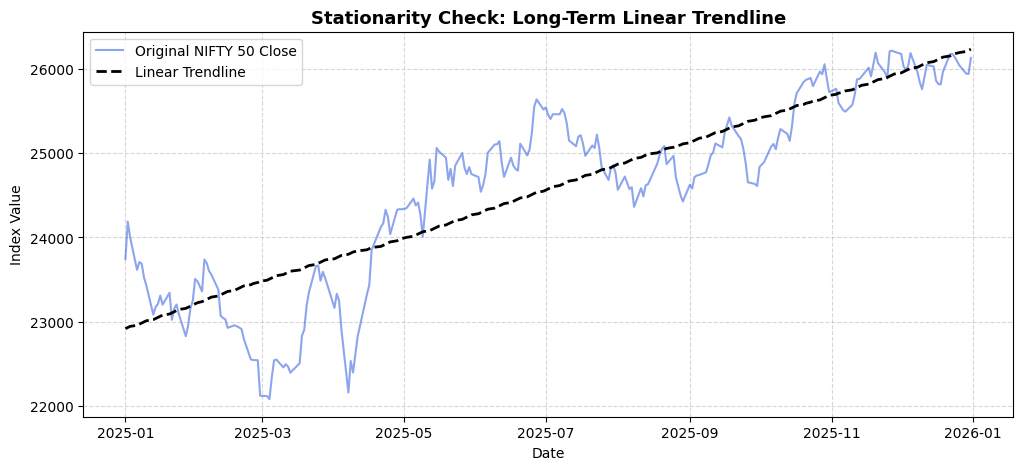
3.6.1 Visual Check 1: Linear Trendline

We will fit and plot a linear regression trendline directly over the original NIFTY 50 Close prices to check if the long-term mean is constant or changing over time.

Show code
import numpy as np
import pandas as pd
import matplotlib.pyplot as plt
from sklearn.linear_model import LinearRegression

# Prepare data
close_prices = nifty_50['Close'].dropna().squeeze()

# Fit Linear Trendline
X = np.arange(len(close_prices)).reshape(-1, 1)
y = close_prices.values
trend_model = LinearRegression().fit(X, y)
trendline = pd.Series(trend_model.predict(X), index=close_prices.index)

# Plotting
plt.figure(figsize=(12, 5))
plt.plot(close_prices, label="Original NIFTY 50 Close", color="royalblue", alpha=0.6)
plt.plot(trendline, label="Linear Trendline", color="black", linestyle="--", linewidth=2)
plt.title("Stationarity Check: Long-Term Linear Trendline", fontsize=13, fontweight='bold')
plt.xlabel("Date")
plt.ylabel("Index Value")
plt.legend(loc="upper left")
plt.grid(True, linestyle="--", alpha=0.5)
plt.show()

print(f"The fitted trendline has an upward slope, indicating that the mean increases over time (Non-Stationary).")

Chart: 3.6.1 Visual Check 1: Linear Trendline

The fitted trendline has an upward slope, indicating that the mean increases over time (Non-Stationary).

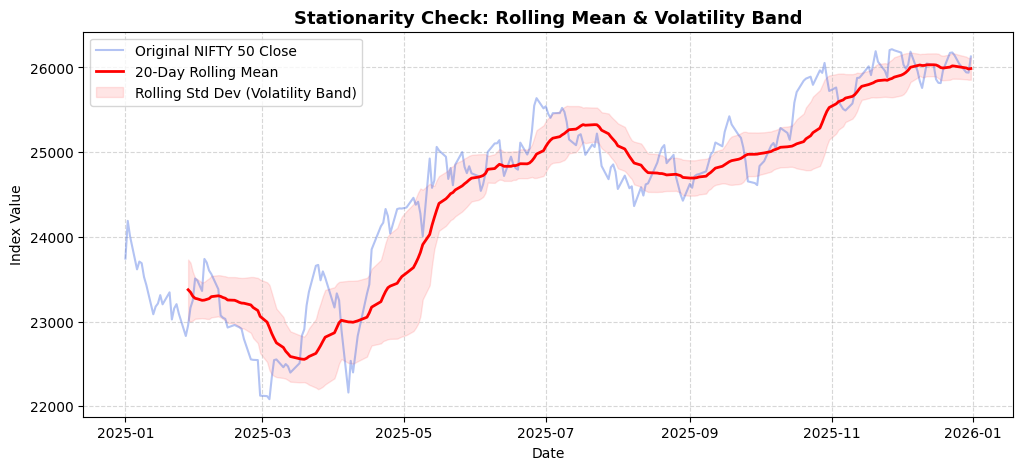
3.6.2 Visual Check 2: Rolling Moving Average (MA) and Variance

We will calculate and plot the 20-day rolling mean alongside the rolling standard deviation bounds to examine whether the local mean and volatility remain stable over time.

Show code
import pandas as pd
import matplotlib.pyplot as plt

# Prepare data
close_prices = nifty_50['Close'].dropna().squeeze()

# Compute 20-day rolling metrics
rolling_window = 20
rolling_mean = close_prices.rolling(window=rolling_window).mean()
rolling_std = close_prices.rolling(window=rolling_window).std()

# Plotting
plt.figure(figsize=(12, 5))
plt.plot(close_prices, label="Original NIFTY 50 Close", color="royalblue", alpha=0.4)
plt.plot(rolling_mean, label=f"{rolling_window}-Day Rolling Mean", color="red", linewidth=2)
plt.fill_between(close_prices.index, rolling_mean - rolling_std, rolling_mean + rolling_std,
                 color="red", alpha=0.1, label="Rolling Std Dev (Volatility Band)")
plt.title("Stationarity Check: Rolling Mean & Volatility Band", fontsize=13, fontweight='bold')
plt.xlabel("Date")
plt.ylabel("Index Value")
plt.legend(loc="upper left")
plt.grid(True, linestyle="--", alpha=0.5)
plt.show()

print("The moving average varies with time and the volatility band width fluctuates, indicating both unstable mean and variance (Non-Stationary).")

Chart: 3.6.2 Visual Check 2: Rolling Moving Average (MA) and Variance

The moving average varies with time and the volatility band width fluctuates, indicating both unstable mean and variance (Non-Stationary).
Show code
import numpy as np
import pandas as pd
import matplotlib.pyplot as plt
from sklearn.linear_model import LinearRegression

# 1. Prepare data
close_prices = nifty_50['Close'].dropna().squeeze()

# 2. Compute 20-day Rolling Moving Average and Standard Deviation
rolling_window = 20
rolling_mean = close_prices.rolling(window=rolling_window).mean()
rolling_std = close_prices.rolling(window=rolling_window).std()

# 3. Fit Linear Trendline
X = np.arange(len(close_prices)).reshape(-1, 1)
y = close_prices.values
trend_model = LinearRegression().fit(X, y)
trendline = pd.Series(trend_model.predict(X), index=close_prices.index)

# 4. Plotting
plt.figure(figsize=(14, 6))
plt.plot(close_prices, label="Original NIFTY 50 Close", color="royalblue", alpha=0.5)
plt.plot(rolling_mean, label=f"{rolling_window}-Day Rolling Mean", color="red", linewidth=2)
plt.plot(trendline, label="Linear Trendline", color="black", linestyle="--", linewidth=1.5)
plt.fill_between(close_prices.index, rolling_mean - rolling_std, rolling_mean + rolling_std,
                 color="red", alpha=0.1, label="Rolling Std Dev (Spread)")

plt.title("Stationarity Check: Trendline & Moving Average (Rolling Window)", fontsize=14, fontweight='bold')
plt.xlabel("Date", fontsize=12)
plt.ylabel("Index Value", fontsize=12)
plt.legend(loc="upper left")
plt.grid(True, linestyle="--", alpha=0.5)
plt.show()

# Quick visual conclusion
print("Visual Diagnosis:")
print("- The upward slope of both the Linear Trendline and the Rolling Mean indicates a CHANGING MEAN over time.")
print("- The thickness of the Rolling Std Dev band also changes, indicating potentially unstable VARIANCE.")
print("==> Since statistical properties depend on time, the original series is visually confirmed to be NON-STATIONARY.")

Chart: 3.6.2 Visual Check 2: Rolling Moving Average (MA) and Variance

Visual Diagnosis:
- The upward slope of both the Linear Trendline and the Rolling Mean indicates a CHANGING MEAN over time.
- The thickness of the Rolling Std Dev band also changes, indicating potentially unstable VARIANCE.
==> Since statistical properties depend on time, the original series is visually confirmed to be NON-STATIONARY.

3.6.3 Visual Check 3: Classical Seasonal Decomposition (Additive vs. Multiplicative)

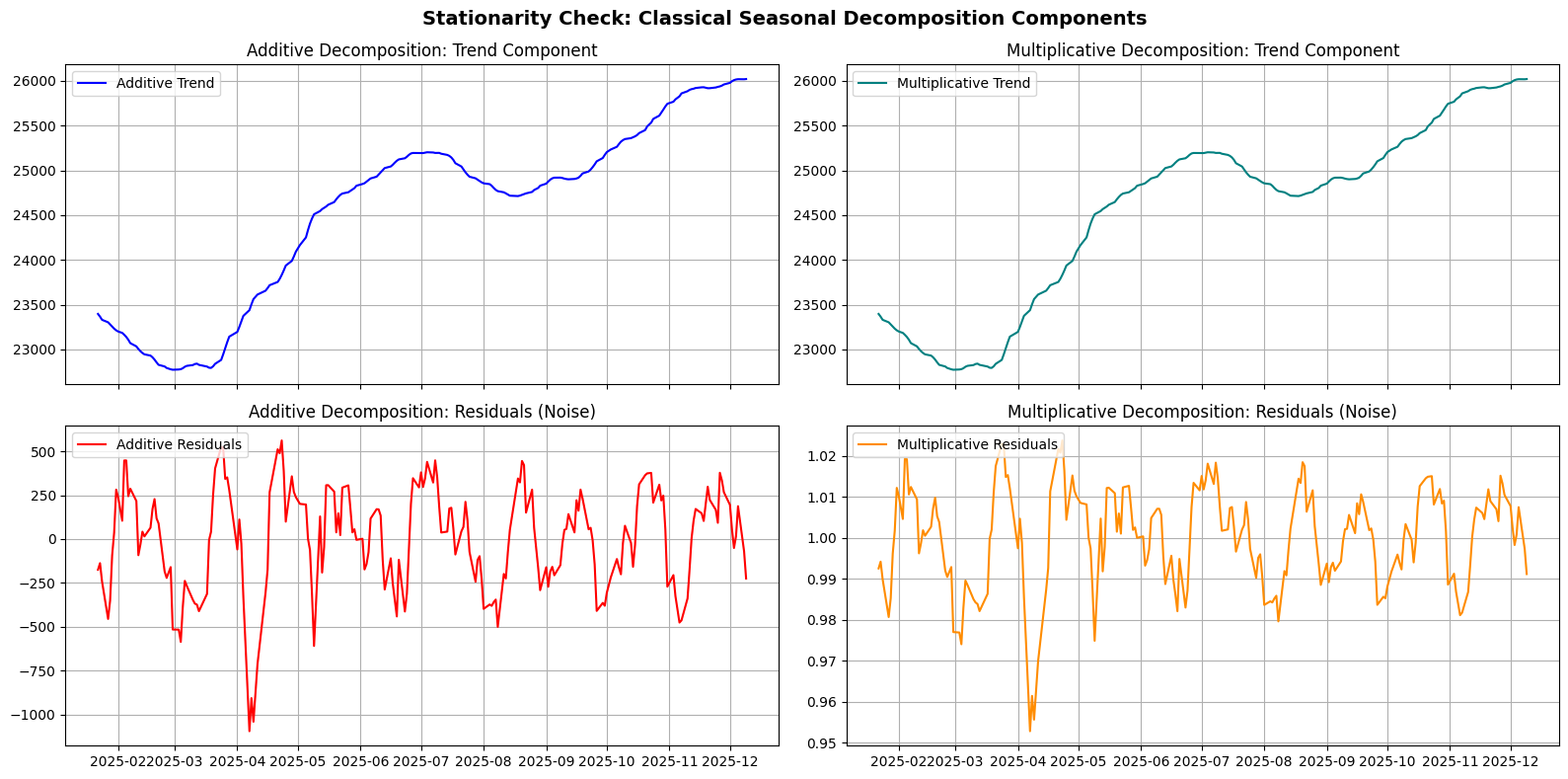
We can decompose the NIFTY 50 Close price to isolate the long-term trend, the cyclical/seasonal fluctuations, and the residual noise to visually determine which parts contribute to the non-stationarity of the series.

Show code
import matplotlib.pyplot as plt
from statsmodels.tsa.seasonal import seasonal_decompose

# Prepare data
close_prices = nifty_50['Close'].dropna().squeeze()

# Perform classical additive and multiplicative decomposition
decomp_add = seasonal_decompose(close_prices, model='additive', period=30)
decomp_mult = seasonal_decompose(close_prices, model='multiplicative', period=30)

# Plotting Additive vs Multiplicative Trends & Residuals
fig, axes = plt.subplots(2, 2, figsize=(16, 8), sharex=True)

# Additive Trend & Residuals
axes[0, 0].plot(decomp_add.trend, color='blue', label='Additive Trend')
axes[0, 0].set_title("Additive Decomposition: Trend Component")
axes[0, 0].grid(True)
axes[0, 0].legend(loc='upper left')

axes[1, 0].plot(decomp_add.resid, color='red', label='Additive Residuals')
axes[1, 0].set_title("Additive Decomposition: Residuals (Noise)")
axes[1, 0].grid(True)
axes[1, 0].legend(loc='upper left')

# Multiplicative Trend & Residuals
axes[0, 1].plot(decomp_mult.trend, color='teal', label='Multiplicative Trend')
axes[0, 1].set_title("Multiplicative Decomposition: Trend Component")
axes[0, 1].grid(True)
axes[0, 1].legend(loc='upper left')

axes[1, 1].plot(decomp_mult.resid, color='darkorange', label='Multiplicative Residuals')
axes[1, 1].set_title("Multiplicative Decomposition: Residuals (Noise)")
axes[1, 1].grid(True)
axes[1, 1].legend(loc='upper left')

plt.suptitle("Stationarity Check: Classical Seasonal Decomposition Components", fontsize=14, fontweight='bold')
plt.tight_layout()
plt.show()

print("Visual Diagnosis:")
print("- The isolated Trends (both Additive & Multiplicative) change over time, showing a strong non-stationary mean.")
print("- The residuals (noise) show stability around a constant level, hinting at stationarity once trends are fully removed.")

Chart: 3.6.3 Visual Check 3: Classical Seasonal Decomposition (Additive vs. Multiplicative)

Visual Diagnosis:
- The isolated Trends (both Additive & Multiplicative) change over time, showing a strong non-stationary mean.
- The residuals (noise) show stability around a constant level, hinting at stationarity once trends are fully removed.

Citation

BibTeX citation:
@online{alekha2026,
  author = {Alekha, Gujuri},
  title = {Stationarity in {Time} {Series} {Analysis}},
  date = {2026-10-11},
  url = {https://gujurialekha.github.io/blog/time-series/02-stationarity.html},
  langid = {en}
}